Ui.Vision 10 Beta: AI, Javascript uiv.* macros and new real user browser clicks that need no focus

Early beta, soft launch. Only announced here :grinning_face:

What’s new:

:robot: The AI assistant that writes and fixes scripts. Describe what you want, or hit Fix with AI on a failing macro — it inspects the page, writes the script, runs it, reads the log and iterates. JS is what makes this work well: the AI is far better at writing a program than at filling in a command table, and when it fails, the error tells it exactly what went wrong. Soon: UI.Vision speaks MCP, so Claude Code (or any MCP client) can drive your side panel directly, with your project context behind it (details follow).

:computer_mouse: Real browser clicks from script that (unlike XClick desktop clicks) require no focus. uiv.browser.click, .move, .type — genuine mouse and keyboard input inside the browser, no XModule needed, and they hit whatever you can find: a locator, an image, OCR text, or coordinates. Because targets are now composable in JS, “click 40px right of that label” or “find inside this area only” is one expression instead of a special command variant. Chrome and Edge, also with the window in the background; Firefox runs everything else.

:memo: Macros can now be JavaScript. A new macro kind, next to the classic table: plain modern JS with a uiv.* API — uiv.click, uiv.type, uiv.findImage, uiv.ocr.findText, uiv.csv.*. Real if/for/try/catch instead of while_v2 and !statusOK juggling, real exceptions with real messages, breakpoints and step-through. Anything without a JS equivalent still runs via uiv.run('command','target','value'), so nothing is out of reach. All demo macros ship in both flavors so you can read them side by side. Scripts also run 50–300× faster in tight loops than the old interpreter.

Feedback, bug reports and opinions on are very welcome.
tried;

scenario:

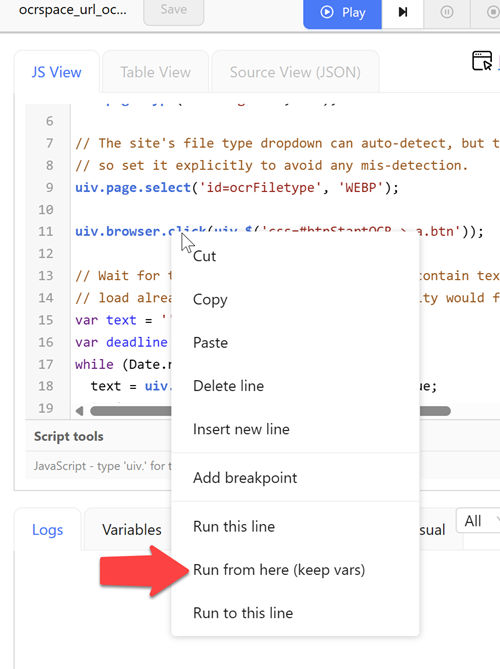
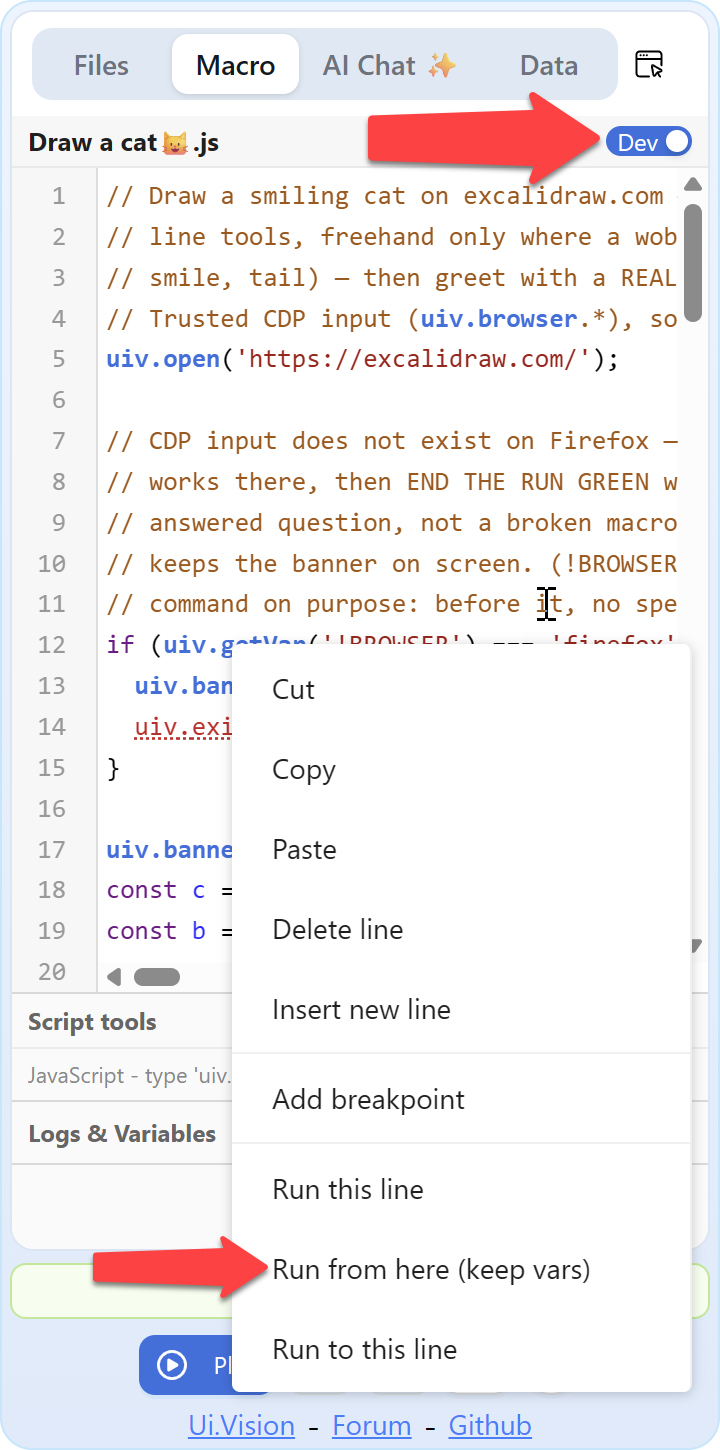
1.don’t see the loop function and the “Play from here” command as previously;

2.the new ”Btype” worked, while ”Xtype” not work with ${KEY_ESC} (XModule insalled);

question:

1. where are they? missing in this version?

2. why ”Xtype” not work with ${KEY_ESC}, which is known as real user simulation?

expectation:

1.have them as before;

2.have the logic understood;

PS: other points, not so fancy currently to have personally,

thanks.

  1. Loop function is removed, as the script can do it easily now. In the AI chat you can just say “Make the macro loop 10 times”, and the loop will be added. Typically the AI chat will add something like for (var i = 1; i <= 10; i++) {....}

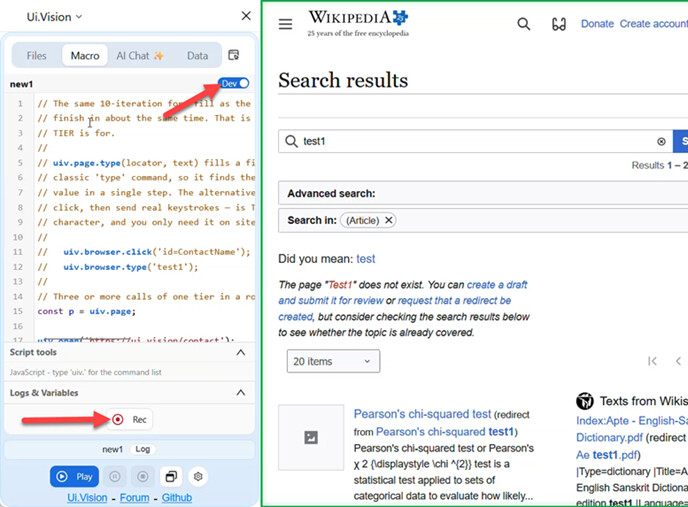
  2. Play from here is still there, in the sidebar you need to have the “Dev Mode Switch” on to see it:

In IDE as always:

We only kept the “Run from here with vars”, as the plain Run from here with reset vars seems rarely used/needed. Also, I see that we used Run instead of Play, that is a typo that will be fixed.

”Xtype” not work with ${KEY_ESC},

We will test it. If it does not work, that would be a bug, and will be fixed.

ok. glad to know those.

while for this, i’ve been using ui.vision(”Xtype”) more than 8 years? (meanwhile with ${KEY_ESC}) hundreds of times , and it’s the 1st time i encounter it’s not working(meanwhile BType is working luckily after test), so i mean: rarely happened here. while don’t know the code logic here and there, just know the notion here(real user simulation). so confused. (and for the test site, maybe not convenient to share here.)

I’d like to know whether the new JavaScript macro format will change anything about how the Command Line API is used. Could you please clarify?

No change => The command line API works exactly as before. If you would spot any change, that would be a bug and we will fix it. The command line can run the old “classic” macros and the JS macros.

Also, there is a new second API to remote control the browser extension, the UI.Vision MCP bridge, written in Node JS. It allows you to connect the RPA extension to tools like Claude Code to automatically run macros, debug macros and even create JS macros.

I cannot create new macros in firefox….have to open IDE wibdow to even see an option…when I hot the “plus macro” button and name a macro, nthing happens.

Thanks for this error report! I confirmed it. The “+ macro” button in the IDE does not work. Also, the record button does not show. We will fix that asap.

Workaround: Use sidebar, turn on DEV MODE and the record button is enabled:

Another workaround is to ask the ai chat to create the macro for you. Example:

thanks, short term I created them in chrome extension and then refreshed firefox :slight_smile: I could just switch to chrome…but I use different rowsers for different things.
@agordon10 The developers uploaded a new Ui.Vision for Firefox version (V10.0.32) that fixes the missing “+Macro”/“Rec” button bug (and a few other things).

Recording a macro:

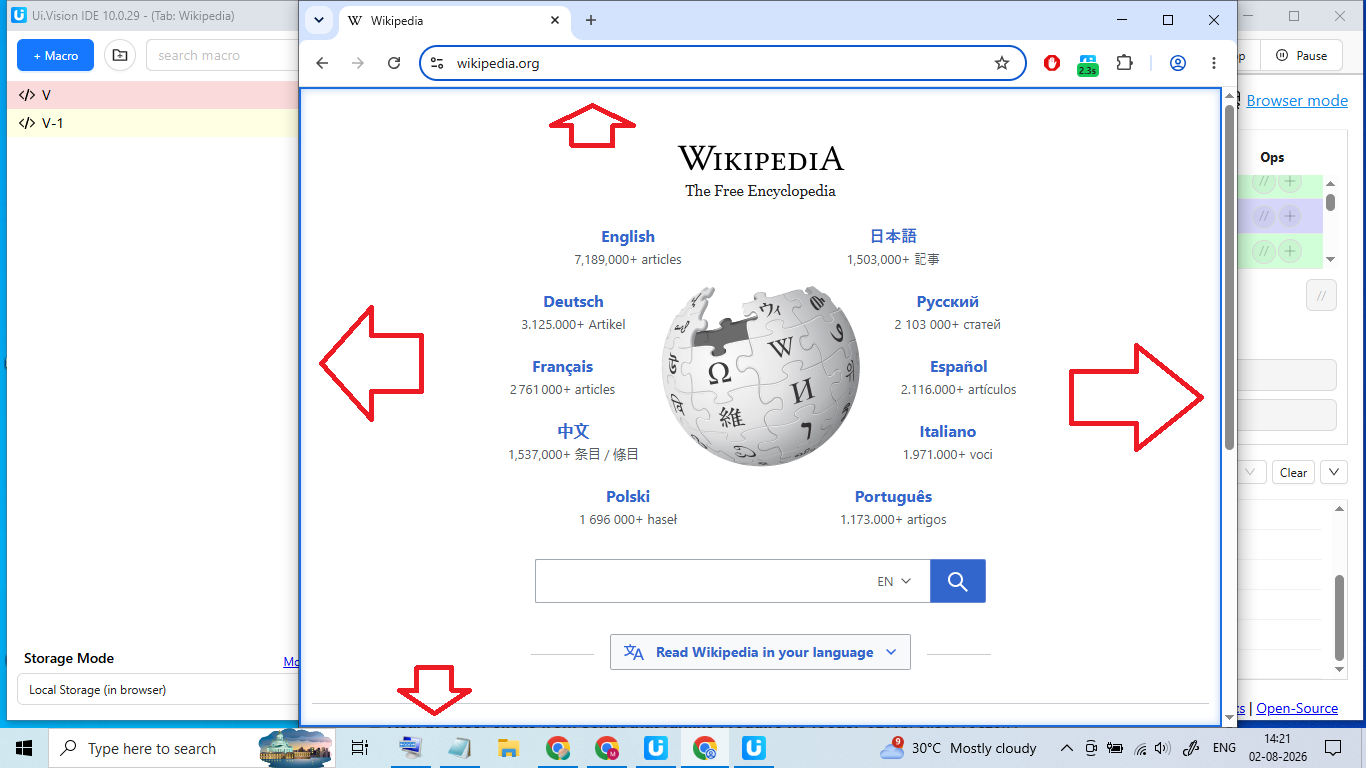
How to Disable blue border line around the page, please check the image

excellent, thanks for the quick response!

This blue border shows during macro replay, and it turns green when macro replay was successful. Orange border during AI macro replay and red border during macro recording.

The border should disappear once the macro is stopped (but it does not currently, and this is a bug that will be fixed, thanks for the hint).

Or you also want to remove the border during replay? If so, why? We can add a setting for this.

Thanks for the quick reply and for confirming the color meanings — that’s helpful context!

Regarding the border during replay: yes, I’d like the option to turn it off. My reason is mainly that it’s visually distracting while watching the screen during long or repeated macro runs (e.g. when using loops) — I’d prefer a cleaner/undistracted view of the page while automation is running.

A simple setting to toggle the border on/off during replay (separate from the recording indicator, which I’m fine keeping) would be great. Thanks for considering it!

So, there are a few things going wrong here.

First, the extension updated itself in the middle of a macro I was running, stopping it from running. I returned to find it has stopped for no obvious reason, and then saw the update stuff.

Ok, so let’s go turn off auto updates–seems possible in Firefox, but oops, no option in chromium-based browser.

Second, in some testing I did this morning, the “AI” auto assistant is running wild doing things I didn’t ask it to, like truncating HTML I asked it to save to an arbitrary 500 characters limit instead of saving the whole thing, and changing from an infinite loop that I stop or start manually whenever I wish to a finite loop with an arbitrary limit.

Finally, it’s automatically running whatever it “creates” unless I specifically tell it not to. Who knows what will happen if I just let it run like that?

And it saves its work as JS, again unless I specifically tell it not to, making for a confusing mess when you open in a text editor like Notepad to compare the new version with the original JSON. (Bye-bye, neat line breaks, here’s a big, undifferentiated blob of text for you!)

I can see potential as a tool tor getting started or refining macros, but it might take me just as long to check that what it produces is actually what I wanted as it would for me to come up with it myself. I do not like software that starts modifying things that I didn’t tell it to modify–that’s a recipe for hours of troubleshooting fixing problems that never should have happened.

At the very least it should be prompting the user to ask if we actually want it to do such things: “Do you want me to truncate the HTML? Do you want me to make this a finite loop of X iterations? Do you want me to run this now? Do you want this in JS format or JSON format?” etc.

Otherwise, a tool should not be attempting to be “smarter” than its user.

Correct! Firefox even has an old versions archive. For Ui.Vision for Chrome, we offer upgrade protection as part of our Enterprise license.

Correct and by design, but the AI chat only ever edits/saves macros in the “AI generated” folder. It never rewrites existing macros outside of it (if it does, that would be a bug).

Important: You can change the AI behavior by editing the system prompt on the AI tab. For example, you could tell it to prefer certain commands over others.

Note that the AI assistent comes at different levels of intelligence :brain: :nerd_face:, please see this new AI provider ranking.

The default and free Ui.Vision AI provider is of only mediocre intelligence, at least at the moment. It is ofen useful, but others are better (and more expensive).