Copyfish: Auto clipboard NOT EFFECTIVE

DON’T KNOW if it’s my browser/ad blocker (ABP) config .. edge/W11/ABP ad block plus; but only INTERMITTANTLY .. does the clipboard fulfill automatically.

~ irritating, as U can imagine .. such that you’ve made it such a proviso in its improvements!

advise if U require add’l info

Thanks for the report. This isn’t your ad blocker, it is a bug in the Copyfish extension. The browser only lets an extension write to the clipboard within a few seconds of your last click, so auto-copy failed whenever the OCR took longer than that.

A fix is in the works for an upcoming version. Until then, the “Copy to clipboard” button always works.

APPRECIATE your IMMEDIATE REPLY & DEVOTION to getting this refined! Obviously an intuitive, clever design that, upon working, SAVES CLICKS/TIME!

Thanks a lot for bringing this tricky issue to our attention!

The issue is fixed with V7.0 .16, which is now available :slightly_smiling_face:

It actually has two fixes:

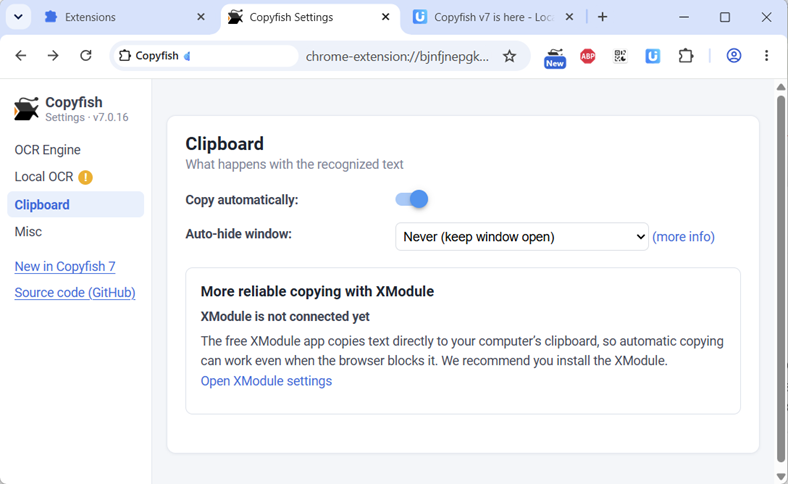
  • The new version requests the “Write to Clipboard” permission from the browser. This prevents the issue in most cases.
  • If installed, the clipboard feature uses the XModule2 now. This is the most robust solution. It solves the issue in all cases. :backhand_index_pointing_left:

This is how the new clipboard settings page looks after the update: