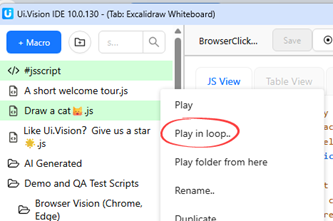
I have several automations at work that relied on the loop button, but since the update, I can no longer use UI Vision effectively; I have to process CSV lines one by one and manually trigger playback for each to complete my tasks.
I would like the feature that allows selecting a specific number of processes to be restored, as it was crucial for my workflow. Currently, many of my tasks are stalled because I cannot get UI Vision to run them automatically.
We removed it because it seemed like an unused feature… …maybe we are wrong and need to re-add it. → How are you using it?
Currently we have these workarounds - does any of these work for you?:
Table macros: Loop inside the macro: add a times command as the first step (Target = number of repeats) and end as the last step. The macro then replays that many times on a normal Play. The current round is available as ${!TIMES}.
JS script macros: use a normal for or while loop.
Replay without editing the macro: put the macro in a folder, right-click the folder in the Files tab and choose “Testsuite: Play in loop” — it asks how many rounds to run. (This is also the mode the “If error happens in loop” setting in Settings > Replay applies to.)
638I mentioned the button that used to be near the current “play” button, which allowed us to set a range of processes (from x to y) to run in a loop. Removing that button has significantly slowed down my workflows; the alternative “play in loop” method doesn’t let me resume from the point where a process might have stopped. To pick up where I left off, I now have to open the CSV, delete the completed rows, and restart the job with the remaining processes. With the previous button, I could simply check the log to see which process hadn’t finished and restart the loop from that point to the end. If possible, please bring that button back in the next version.
Removal of the Loop range killed my workflow also.
I have a spreadsheet full of variables where each row is an end-to-end test. The Loop range allowed me to run any group of tests I needed back to back without having to change my source files. Starting a run at line X and ending at line Z is essential functionality for some of us.
Just wanted to give another use-case in support of the feature.
As a work around you could add an if statement to your macro to start the loop where you’d like it to start.
begin by storing a variable called “beginLoop” or name it whatever you like.
then add an if statement to start the macro at ${beginLoop}
if you are Looping 50 times but want to start at loop 8
store|8|beginLoop
If|${!Loop} >= ${beginLoop}|
…loop run here starting at ${beginLoop} value
End| |
don’t forget to add the “End” statement at the end of the loop.
if you need more details let me know and I’ll create a short demo macro
Could someone help me with the Play in loop button? When I use it, the commands run way too fast, not at the same speed they used to before. Is there any way to control or slow down the execution speed when the macro is running in a loop?
I’m a beginner, and just relying on Chat GPT, can you please guide me? I’ve tried copying your suggestion but when I run, it nothing happens. It successfully executes but nothing is happening.
 and need to re-add it. → How are you using it?
 Play. The current round is available as ${!TIMES}.