@tellengold Interesting point! Just to clarify your suggestion further:
-
So you are suggesting a switch like “Always ask before running a macro”? I added this to our todo list.
-
Or the option to turn off AI chat altogether? This is already doable by not selecting an AI provider.
The risk you mention is there. Clearly, we do not make any LLM models ourselves. The responsibility lies with the model and, of course, finally with the user. To mitigate the risks, we put extra effort into visualizations and overlays, so it is as easy as possible for the user to see what is being done. And for remote control of Ui.Vision via the MCP interface, there is a red “emergency stop” button. I like to think that in this respect using Ui.Vision is safer and better an than e. g. Claude for Chrome or the ChatGPT chrome extension.
We use Fable/Codex/Gemma/Qwen/… + Ui.Vision MCP for pretty much everything internally, including sensitive tasks like generating tax reports etc. However, we do watch carefully while it clicks around in an active bank account. That is no task I would run unattended while the LLM controls Ui.Vision browser. For routine daily or weekly tasks we let Fable create the Javascript macros for us, test them carefully, and then run these. The macros - in contrast to LLM driving the browser - run fast, deterministic and at no token cost.
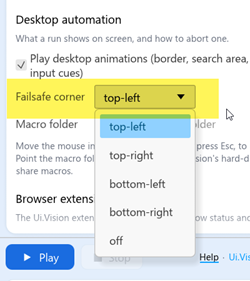
Desktop automation includes a “Failsafe corner” so users can move the mouse there to stop any automation. Pressing ESC does the same.