When I run the command selectWindow | tab=-1, I keep getting:
[error][ignored]
Line 13: E225: DOM failed to be ready in 30sec.30sec.
I closed and reopened the ui.vision IDE but it keeps happening.
When I run the command selectWindow | tab=-1, I keep getting:
[error][ignored]
Line 13: E225: DOM failed to be ready in 30sec.30sec.
I closed and reopened the ui.vision IDE but it keeps happening.
Do you have a test macro for us?
@Admin. I emailed a test macro to the team 10-months ago after years suffering this issue and yourself and/or the team repeatedly asking for a test-case. I was promised it would be tested and investigated after putting considerable time providing feedback to help kill the issue. I’ve heard nothing back apart from a note the following day to say it would be tested “next week”, maybe.
I just checked my email to make sure I’m not going mad and in here to see if the issue had gone away and discover it’s still prevalent and you’re still asking for test-cases.
Is there any intention of fixing this finally?
This issue is fixed with the new version 10. The new uiv. commands have improved tab handling. See for example the new tab automation demo macro:
// JS version of the DemoTabs macro — same flow, same tab numbering as
// the classic one. A click that opens a new tab does NOT hand focus to it
// (a dispatched click carries no user activation, so the tab opens in the
// background), so switch explicitly with selectWindow. All primitives
// target the ACTIVE tab and selectWindow activates the tab it selects, so
// after each switch the whole API follows automatically.
//
// tab=N counts from the tab the macro STARTED on: tab=1 is the first tab
// to its right, tab=2 the second — the number does not depend on where the
// previous command left off.
uiv.open('https://ui.vision/demo/tabs');

// Tab position comes from the uiv.tabs API, not a !variable: the classic
// ${!CURRENT_TAB_NUMBER} / ${!current_tab_number_relative} pair is
// table-macro bookkeeping and THROWS in a script — only classic-player
// commands refresh it, so next to uiv.tabs.* it goes silently stale.
// Every uiv.tabs.* call returns where you are, and uiv.tabs.list() marks
// the tab the script acts on with current: true. Indexes are 1-based,
// what the tab bar shows. For the classic macro's "relative" numbers,
// capture the start index once and subtract: same numbers, same asserts.
const tabAbs = () => uiv.tabs.list().find((t) => t.current).index;
const startTabIndex = tabAbs();
const tabRel = () => tabAbs() - startTabIndex;
const logTabs = (color) => {
  uiv.log(`TabIndexAbsolute=${tabAbs()} TabIndexRELATIVE=${tabRel()}`, color);
};
const assertTabRel = (want, where) => {
  const got = tabRel();
  if (got !== want) {
    throw new Error(`relative tab index at ${where}: expected ${want}, got ${got} ` +
      `(absolute ${tabAbs()}, start tab ${startTabIndex})`);
  }
};

// a dispatched click carries no user activation: Chrome opens the link's
// tab in the BACKGROUND, Firefox's popup blocker eats it entirely — detect
// that and open the link's href directly (the selectWindow calls below
// address tabs absolutely, so both routes continue identically)
const openLinkedTab = (linkText) => {
  const before = uiv.tabs.list().length;
  uiv.page.click('link=' + linkText);
  uiv.sleep('1s'); // let a background tab finish opening
  if (uiv.tabs.list().length > before) return; // Chrome: opened in background
  const href = uiv.eval("var a = Array.prototype.find.call(document.links, function (x) { return x.textContent.trim() === '" + linkText + "'; }); return a ? a.href : null");
  if (!href) { throw new Error('link not found: ' + linkText); }
  uiv.tabs.open(href); // Firefox: same tab, opened the JS-native way
};

openLinkedTab('Open new web page in new browser tab');
uiv.run('selectWindow', 'tab=1');
const t1 = uiv.eval('return document.title');
if (!t1.includes('TAB1')) { throw new Error(`expected TAB1, got: ${t1}`); }
logTabs('blue');
assertTabRel(1, 'after selectWindow tab=1');
uiv.page.type('id=sometext1', 'this is tab 1 (typed from JS)');

// opened from TAB1 (the rightmost tab), so the new tab lands after it = tab=2
openLinkedTab('Open yet another web page in a new browser tab');
uiv.run('selectWindow', 'tab=2');
const t2 = uiv.eval('return document.title');
if (!t2.includes('TAB2')) { throw new Error(`expected TAB2, got: ${t2}`); }
uiv.page.type('id=sometext2', 'And this is tab 2! (JS)');

// back to TAB1 and close it — what was TAB2 then becomes tab=1
uiv.run('selectWindow', 'tab=1');
uiv.page.type('id=sometext1', 'Now back in tab 1 - test done! (JS)');
uiv.run('selectWindow', 'tab=close');
uiv.sleep('1s');
const t3 = uiv.eval('return document.title');
if (!t3.includes('TAB2')) { throw new Error(`expected TAB2 after close, got: ${t3}`); }
uiv.log(`After close, now on: ${t3}`);

uiv.run('selectWindow', 'tab=1');
const t4 = uiv.eval('return document.title');
if (!t4.includes('TAB2')) { throw new Error(`expected TAB2 via tab=1, got: ${t4}`); }
logTabs('green');
assertTabRel(1, 'new tab=1 is the old TAB2');

// tab=open always appends a new tab at the far RIGHT of the window and
// switches to it — so each one lands exactly one place right of the previous
uiv.run('selectWindow', 'tab=open', 'https://ui.vision');
uiv.sleep('1s');
uiv.log(`Opened new tab: ${uiv.eval('return document.title')}`);
const afterFirstOpen = tabAbs();
uiv.run('selectWindow', 'tab=open', 'https://ocr.space');
uiv.sleep('1s');
uiv.log(`Opened new tab: ${uiv.eval('return document.title')}`);

logTabs('brown');

// Catching tab bugs is the whole point of these numbers, so both checks are
// hard failures. First the invariant that defines tab=open — each one appends
// exactly one tab further right:
if (tabAbs() !== afterFirstOpen + 1) {
  throw new Error(`tab=open should append one tab to the right: was ${afterFirstOpen}, now ${tabAbs()}`);
}

// ...then the classic macro's last command, assert !current_tab_number_relative
// = 3 (start tab, then TAB2, ui.vision, ocr.space). Like the classic macro this
// assumes the run started in a window with no tabs to the RIGHT of the start
// tab, since tab=open appends past them — if this is the only check that fails,
// that is why.
assertTabRel(3, 'final');
uiv.log('DemoTabs (JS) completed', 'green');
Is the selectWindow command fixed? Or do we need to convert old files to JS?
I recommend to (use AI to) convert to the new JS macro format. In some sense, this new format is the “fix” for many shortcomings of the classic Selenium-style format.
how to run uiv commands?
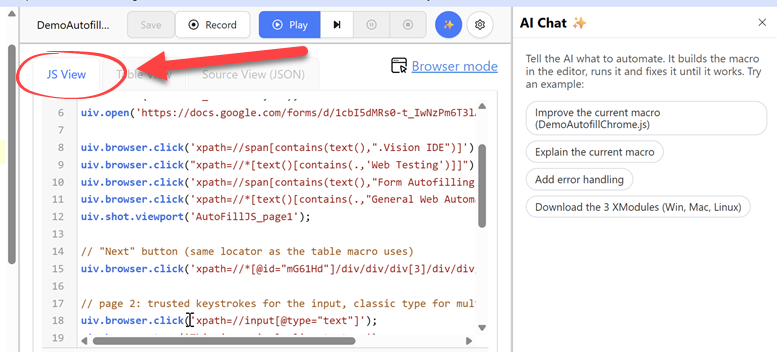
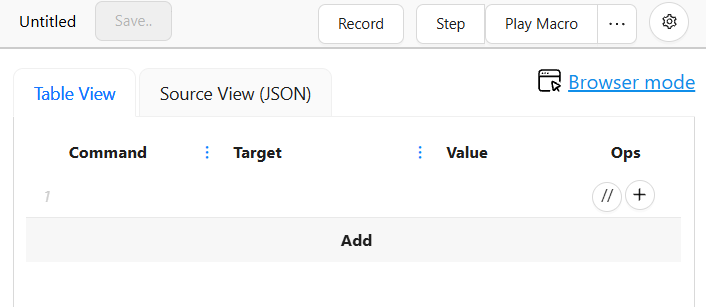
They are run in the new “JS View” tab:
You can also ask the ai chat to convert existing table macros to the new uiv. JS format.
Essentially the JS format is a plain text file with Javascript in it. All Ui.Vision specific code is (behind/inside) the uiv. browser and desktop automation API. Here is a uiv. vs Selenium comparison page.
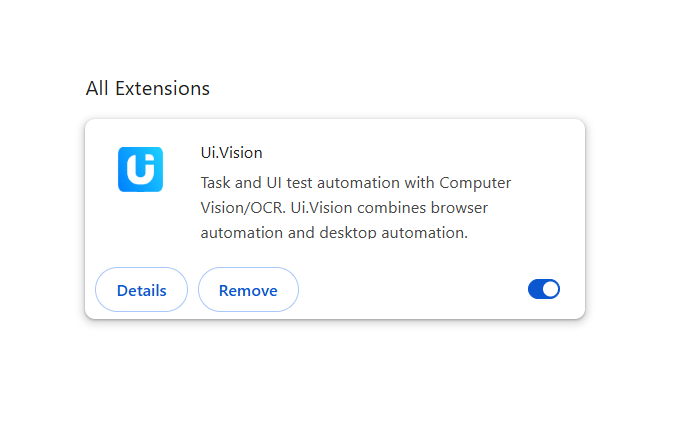
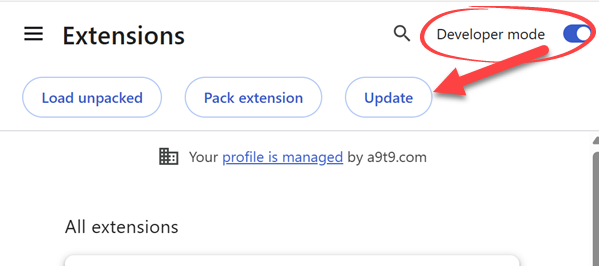
Version 10 → if you press “Update” on chrome://extensions/ the extension will update to 10.
The “Update” button shows only when Chrome “developer mode” is turned on. It is a simple switch on the extension page. Then, the Update button appears on top. It applies to all extensions:
We did not trigger the automated V10 rollout for all users yet, only a few percent. What the “Update” button does is that it manually triggers the extension update.
Of course, a fresh install is also a good option