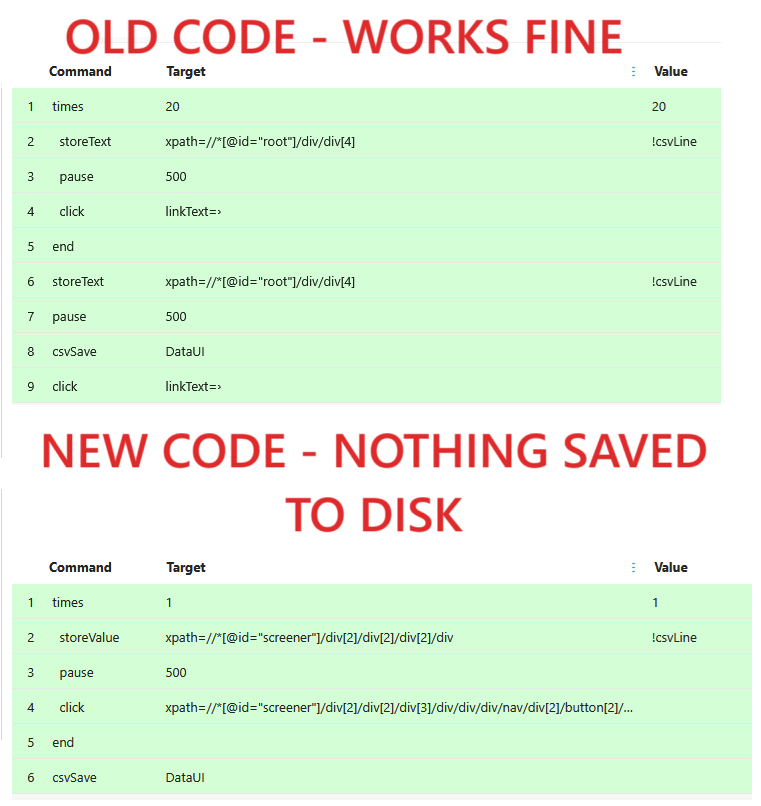
I have a macro that successfully scrapes a table and saves the output to the downloads folder (win11). The table has thousands of rows, of which only a fraction can be seen at a time. The macro scrapes a page and advances to the next set of rows. I duplicated the macro and changed two targets with the hope that it would work on a different website (see the picture below). The macro runs, but no output file is saved to the Downloads folder. Why? (log at the bottom)
Line 2 scrapes the page. I have tried both “StoreText” and “StoreValue” with the new code with no change in result.
Line 4 clicks a link to advance the table to the next set of rows
It works fine on a different website. Both the old and the new websites have a similar design and the scraping problem is the same: scrape the data, advance to the next page, scrape again, advance again, etc.
The problem and the solution requires only two website specific pointers: (a) the material to be scraped, and (b) the HTML to be clicked so as to advance to the next page.So, I took the code that worked on the one website and changed the pointers to reflect the new website. For the new website, the code appears to function without an error, but it doesn’t seem to create any output.
Based on what you see in the code, would you expect the output (if any) to appear in the “Downloads” folder?
The original code writes to the Downloads folder so I assume that the new version does as well; but I’m not certain and I need to eliminate this as a reason for the code failing to achieve its purpose.
I do wonder if your “storeValue” command points to noting. That would explain the issue.
I would save the storeValue in a variable and check if it shows any value. If not, your xpath expression is wrong.
The macro runs without saving an output file because, on the new website, the scrape command is not actually capturing any data, even though it executes without throwing an error. This usually happens when the target element exists visually but is different at the DOM level Equifax Check Your Credit