Playwright MCP vs Claude in Chrome vs Ui.Vision MCP: which browser automation MCP should your AI agent use? A measured 2026 benchmark
Part 1 of 2. This part compares the three kinds of browser tool an MCP agent can use: a vendor agent in your real browser, a separate test browser, and a macro tool. Part 2 compares the vendor agents in your browser head to head: Claude in Chrome vs the OpenAI Codex extension vs Ui.Vision.
Short answer.
-
Claude in Chrome browser extension is the tool for one-off tasks in the browser if you want to avoid any setup. Closed source.
-
Playwright MCP is the tool for headless, cross-browser and CI work. Best tool for background web scraping. By design, it does not work with the logged in browser or on your desktop. Open-Source.
-
Ui.Vision MCP is like Claude for Chrome, but with these advantages:
- it works with any AI provider, including your local LLM.
- it works with Chrome, but also Firefox and Edge
- can control native browser dialogs and extensions
- many tasks can be converted to JS macros, and then run fast and token free.
- Open-Source
The data: Browser Automation Benchmark
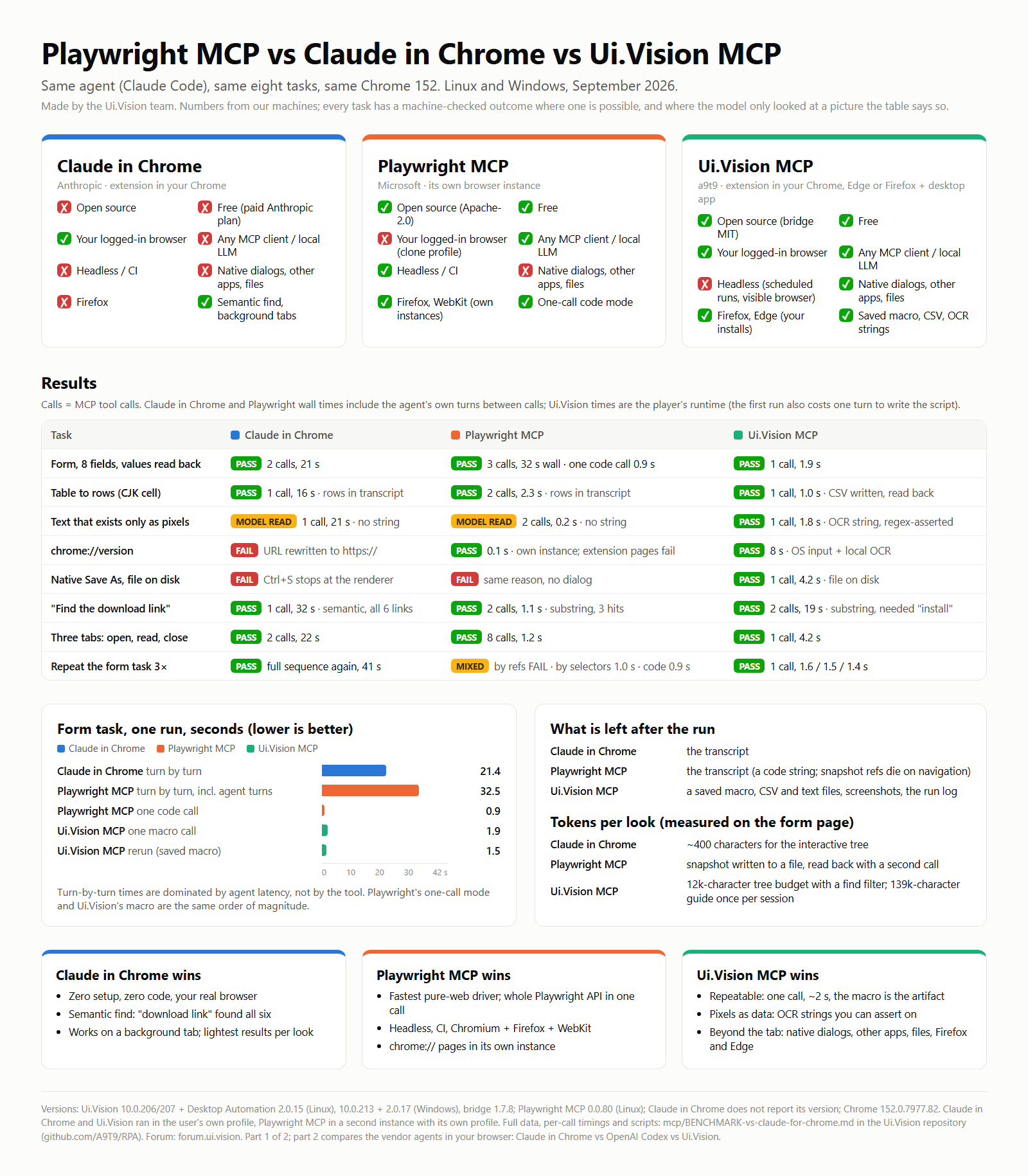
The decision table
| You want to… | Use |
|---|---|
| Look around an unfamiliar page | Claude in Chrome or Ui.Vision MCP |
| Fill a form or scrape a table once, nothing to keep | any of the three; |
| Drive a web page fast from code | Playwright MCP (one code call, ~1 s) or Ui.Vision (one macro call, ~2 s) |
| Do the same thing again tomorrow, or on a schedule | Ui.Vision (the macro is the artifact) |
| Read text that exists only as pixels and assert on it | Ui.Vision (local OCR returns a string) |
| Touch a native dialog, another app, the file system | Ui.Vision desktop tier; the other two cannot |
| Open a chrome:// page | Ui.Vision desktop tier, or Playwright MCP in its own instance; Claude in Chrome cannot |
| Work in the user’s logged-in browser | Claude in Chrome or Ui.Vision; Playwright MCP launches a clone browser by default |
| Run it headless, in CI | Playwright MCP; Ui.Vision runs scheduled but in a visible browser; Claude in Chrome cannot |
| Use a local LLM, or a client that is not Claude | Ui.Vision or Playwright MCP (any MCP client); Claude in Chrome is Claude only, paid plan |
| Firefox | Ui.Vision (in your Firefox) or Playwright MCP (its own Firefox); Claude in Chrome cannot |
| Keep the browser tab in the background while it works | Claude in Chrome (Ui.Vision brings its play tab to the front) |
| Avoid any setup | Claude in Chrome |
What the three tools are
Claude in Chrome is Anthropic’s extension. The agent gets tabs, an accessibility tree with refs, a natural-language find, form_input, a JavaScript tool, screenshots, and keyboard and mouse through the DevTools protocol. It lives inside the extension sandbox: DOM plus trusted input, nothing outside the tab. Closed source, needs a paid Anthropic plan, Claude models only.
Playwright MCP is Microsoft’s @playwright/mcp server, Apache-2.0. It launches its own browser (we used --browser chrome, so the same Chrome 152 build as the other two) with its own profile. Tools: navigate, accessibility snapshot with refs, fill_form, click, type, press key, tabs, screenshots, evaluate, network and console logs, and run_code_unsafe, which takes an async (page) => … function, the whole Playwright API in one call. Renderer-only input like Claude in Chrome, and a separate browser unless you point it at a CDP endpoint. Works with any MCP client.
Ui.Vision MCP is the uivision-mcp-bridge (npm, MIT) between the agent and the open-source Ui.Vision extension for Chrome, Edge and Firefox. The optional Desktop Automation app adds OS-level input, screen capture, local OCR and image search. The agent writes a JavaScript macro against the uiv.* API and the extension’s player runs it, or it explores turn by turn with get_page and click_at. Works with any MCP client, including a local model (LM Studio with Qwen3.6-27B drove it end to end).
Setup, side by side
- Claude in Chrome: install the extension from the Chrome Web Store, have a paid Anthropic plan, run
claude --chromeor type/chromein a session. - Playwright MCP:
npx playwright install(or--browser chrometo reuse the installed Chrome), thenclaude mcp add playwright -s user -- npx @playwright/mcp@latest. Free, no account. - Ui.Vision MCP: install the extension from the Chrome, Edge or Firefox store, then
claude mcp add uivision -- npx -y uivision-mcp-bridge(ornpx uivision-mcp-bridge --setup, which writes the entry into Claude Code, Claude Desktop, Cursor, Windsurf and VS Code), enable the bridge in Settings > AI, keep the side panel open. Free, no account. The desktop tier needs the Desktop Automation app installed once.
Ui.Vision has the most steps. Claude in Chrome has the paywall. Playwright is one command.
Method
Same agent (a Claude Code session), same tasks, same Chrome 152 build. Two machines: Linux (GNOME Wayland, 1.25 scaling) and Windows 11 (2560x1440 at 125%). Ui.Vision extension 10.0.206/207 with Desktop Automation host 2.0.15 on Linux, 10.0.213 with host 2.0.17 on Windows, bridge 1.7.8. Playwright MCP 0.0.80 on the Linux machine. Claude in Chrome’s tools do not report their own version. Current releases as of posting: extension 10.0.270, bridge 1.7.16.
Claude in Chrome and Ui.Vision ran in the user’s own Chrome profile. Playwright MCP ran the same Chrome binary as a second instance with its own profile. That one fact explains half of its results.
Calls are MCP tool calls. Wall time for Claude in Chrome and Playwright MCP is measured around the calls and includes the agent’s own turn latency where there was one, because that is the real cost of driving a page turn by turn. Ui.Vision runtime is the player’s own number; the first run also costs one agent turn to write the script, and we report both. Tokens are reported as characters of tool result per look, not as adjectives.
Results
Windows numbers for Ui.Vision and Claude in Chrome, Linux numbers for Playwright MCP. The Linux numbers for the first two are in the raw file linked at the end and tell the same story.
| Task | Ui.Vision MCP | Claude in Chrome | Playwright MCP |
|---|---|---|---|
| Form, 8 fields, values read back and compared | 1 call, 1.9 s (Linux 2.0–2.4 s) | 2 calls, 11 actions, 21 s (Linux 3 calls, 35 s) | 3 calls, 1.9 s tool time, 32 s wall including 3 agent turns, one lost to a schema slip; as one code call 0.9 s |
| Table to rows (5 rows, one CJK cell) | 1 call, 1.0 s, CSV written and read back | 1 call, 16 s, rows only in the transcript | 2 calls, 2.3 s, rows only in the transcript (the code tool has no require, so no file) |
| Text that exists only as pixels (canvas invoice) | 1 call, 1.8 s, local OCR, regex-asserted string | 1 call, 21 s, model reads a zoomed screenshot | 2 calls, 0.2 s, element screenshot read by the model, no string comes back |
| chrome://version | PASS via OS input plus local OCR, 8 s, version string returned | FAIL, the URL is rewritten to https://chrome://… on both OSes | PASS in 0.1 s in its own instance; extension pages FAIL, its profile has no extensions |
| Native Save As dialog, file on disk | PASS, 1 call, 4.2 s (a first attempt failed on its own guard, see below) | FAIL by design: Ctrl+S goes to the renderer, no dialog, verified by a screen capture | FAIL by design, same reason: page keeps focus, nothing on screen, no file |
| “Find the download link” on ui.vision | 2 calls, 19 s: substring search needed the literal word “install” | 1 call, 32 s: semantic find returned all six install links with descriptions | 2 calls, 1.1 s: substring find returned 3 matches |
| Open three tabs, read titles, close them | 1 call, 4.2 s (Linux) | 2 calls, 12 actions, 22 s: a new tab’s id is only known after the batch | 8 calls, 1.2 s, one agent turn: the tab index comes back at once |
| Repeat the form task three times | 1 call, 1.6 / 1.5 / 1.4 s per run | the full 2-call sequence again, 41 s | by snapshot refs FAIL three times (refs change per navigation); by CSS selectors 1.1 / 1.0 / 1.0 s; as one code call 0.9 / 0.9 / 1.3 s |
[IMAGE 1: desktop capture from the Windows run, the “‘Claude’ started debugging this browser” bar, the Ui.Vision side panel and the test tab side by side]
Token cost, measured on the form page: Claude in Chrome’s interactive-only tree was about 400 characters. Ui.Vision’s get_page tree defaults to a 12k-character budget with a find filter, and its authoring guide is 139k characters, which exceeded Claude Code’s tool-result limit and was spilled to a file. Until 10.0.217 every run_macro result carried a 1.1k-character self-check note; it now comes only with the first run, after a gap, or on runs that used visual finders or OS input. Playwright MCP writes every snapshot to a page-<timestamp>.yml file the agent reads back with a second tool.
Head-to-head
| Ui.Vision MCP | Claude in Chrome | Playwright MCP | |
|---|---|---|---|
| Built by | a9t9 | Anthropic | Microsoft |
| Open source | extension on GitHub, bridge MIT | no | yes, Apache-2.0 |
| Cost | free (cloud OCR key optional) | paid Anthropic plan | free |
| Browsers | Chrome, Edge, Firefox, your installs | Chrome | Chromium, Firefox, WebKit, its own instances |
| Runs in your logged-in browser | yes | yes | no by default |
| Any MCP client, local LLM | yes | no | yes |
| Tools exposed | 24 | 22 in our session | not counted by us |
| Input tiers | DOM, trusted CDP, OS keyboard and mouse | DOM, trusted CDP | renderer via Playwright |
| Reads pixels as data | OCR, image search, color, AI find | model looks at a screenshot | model looks at a screenshot |
| Native dialogs, other apps, files | yes | no | no |
| What remains after a run | macro, CSV and text files, screenshots, log | transcript | transcript |
| Scheduled or command-line runs | yes, visible browser | no | yes, headless |
| CAPTCHA | refuses to solve, hands over to a human | pauses, asks the human | manual |
| Security blast radius | your browser and your desktop | your browser sessions | isolated profile |
| Test generation | JS macro is the artifact | not designed for it | native |
Where Claude in Chrome wins
- Zero setup, zero code, no panel to keep open, and it is your real browser with its logins and tabs.
- Semantic find. “Download link for the extension” returned the right six links with one-line descriptions. Ui.Vision’s
get_page findand Playwright’sfindare substring matches; both needed the literal word. - It works on a background tab. Your foreground is not touched. Ui.Vision brings its play tab to the front for every run.
- The model’s vision is a good reader for anything a screenshot shows, and
browser_batchpacks a whole interaction into one round trip. - The lightest tool results per look in our measurement.
Where Playwright MCP wins
- Speed on the pure-web path. Selector-based
fill_formplusevaluateis about 1 s per task andrun_code_unsafeis one 0.9 s call: the same order as a Ui.Vision macro, an order of magnitude under Claude in Chrome’s turn-by-turn 15–40 s. - The whole Playwright API in one call, and Playwright locators are familiar to every web developer.
- Tabs, JS dialogs, network log, console, file upload and PDF are first-class tools, and a new tab’s index comes back immediately.
- chrome:// pages open in its own instance, the one place it beats an extension-based tool without OS input.
- Headless and CI. The only one of the three that runs in a pipeline, across Chromium, Firefox and WebKit, free, with any MCP client.
Where Ui.Vision wins
- One call, about 2 s, deterministic, and the script is the deliverable: a saved macro, a CSV in the file store, a file in Downloads. Reruns cost no agent turns. Playwright matches the speed but keeps nothing; refs are minted per snapshot and its code tool cannot write a file.
- Machine-checkable results from pixels. Local OCR returned the invoice string and the script asserted on it. The desktop tier read the Chrome version off the screen. The other two hand the screenshot to the model’s eyes.
- It reaches outside the tab: the native Save As dialog, other apps, chrome:// and extension pages through the desktop tier. Claude in Chrome and Playwright MCP fail the Save As task identically, the keystroke stops at the renderer.
- Your own browser, like Claude in Chrome and unlike Playwright’s clone profile, and in Firefox and Edge as well.
- Open source, free, LLM-agnostic. Any MCP client, including a local model.
- Self-verifying runs. Log, timing line, final variable values, a failure class, and the run pictures on failure. The first Save As attempt is the example: the OCR guard failed, the run picture showed the dialog open, and a
document.hasFocus()guard made it a one-call task.
Honest cons
Ui.Vision
- Authoring cost. The guide is huge, a typo is a full round trip, and the first run costs an agent turn like any Claude in Chrome step.
- The panel must be open, one run at a time, the play tab comes to the front, no headless mode. The most setup steps of the three.
- OS input reaches every window, not only the tab. The mitigations are real (localhost-only bridge, pairing token, a STOP strip in the panel, every action in the log), but a dedicated profile and a VM are still the honest advice for anything sensitive.
Claude in Chrome
- The extension ceiling: no OS input, no native dialogs, no file system, no chrome:// or extension pages; navigate rewrites those URLs.
- Nothing reusable remains. Every rerun is the full sequence and the result lives in the transcript.
- Turn latency dominates: 16–41 s per task here versus 1–8 s.
- Pixel reads are an LLM judgment; no string comes back to assert on, and a crop can cut the target.
- Tab ids created inside a batch are only known after the batch.
- Paid plan, Claude only, closed source, no headless, no Firefox.
Playwright MCP
- It is not your browser. A second Chrome with an empty profile: no cookies, logins, extensions or open tabs.
--cdp-endpointand--extensionmodes exist but need Chrome started for remote debugging or a bridge extension installed. - Renderer-only input, the same ceiling as Claude in Chrome: no OS keyboard or mouse, no native dialogs, no other windows.
- Pixels are opaque: no OCR, image or color finder; a screenshot is read by the model.
- Nothing persists in the tool: no macro store, no CSV, no schedule, and
run_code_unsafehas norequire, so not even a file. Ref-based sequences do not replay; selector-based calls or code do, but they live in the agent’s context. - Snapshots spill to disk as files the agent must read back; its find is a plain substring match; a schema slip costs a turn like anywhere else.
Both extension-based tools attach the DevTools debugger for trusted input, and both raise Chrome’s “started debugging this browser” bar.
[IMAGE 3: Playwright’s separate Chrome window with its “unsupported command-line flag” infobar next to the user’s Chrome]
Six scenarios
- Verify a UI change on a logged-in staging dashboard: Claude in Chrome. Your session, semantic find, a look and a report.
- A checkout flow on Chromium, Firefox and WebKit, in CI: Playwright MCP.
- Every Monday, export a table from a logged-in portal to a CSV: Ui.Vision. The table task took 1 s, the CSV landed in the file store, the macro is scheduled. The other two leave rows in a chat.
- Save a page through the browser’s native dialog, press a button in a desktop app, read a value off a PDF viewer: Ui.Vision desktop tier. The other two send the keystroke to the renderer and nothing happens.
- Pull the total off a canvas-rendered invoice and decide on it: Ui.Vision local OCR, a string in 1.8 s; for stylised text,
uiv.ai.ask. The other two give the model a picture. - A local model and no Anthropic plan: Ui.Vision or Playwright MCP through LM Studio’s MCP support. Claude in Chrome is out.
Security
Claude in Chrome and Ui.Vision run with your sessions. Ui.Vision’s desktop tier adds your whole desktop. For all three: a dedicated browser profile, a VM for OS-level runs, and never point any of them at production. Playwright MCP is isolated by construction, which is also why it cannot see your logins.
What Ui.Vision does about it: the bridge listens on 127.0.0.1 only and store-installed browsers must pair with a token; nothing runs unless the bridge is enabled and the panel is open; a purple “MCP: chrome#1” strip shows the tool being executed with a STOP button that halts the macro and switches the bridge off; every action is echoed in the log; user macro files are never overwritten; demo macros never run without confirmation; the prompt refuses CAPTCHA solving and bot-detection bypass. Data leaves the machine only when a cloud OCR or AI engine is configured; the local engine keeps everything on the machine.
Use them together
All three can be loaded in one Claude Code session; that is how this post was made. Explore with Claude in Chrome (or Ui.Vision’s own get_page and click_at), prototype the web part as a Playwright code call if you like, then ask Claude to write the Ui.Vision macro that replays it in your browser. Pick the two that cover your gaps; the head-to-head table says which.
What we did not test
Claude in Chrome’s GIF recorder, shortcuts and multi-browser selection. Playwright MCP’s network, console and PDF tools, headless mode and --extension mode. Ui.Vision’s image search, ai.find and scheduling. Chrome DevTools MCP as a fourth tool for performance debugging. The OpenAI Codex Chrome extension is deliberately not in this table: it is its own agent, so it cannot be driven by the same Claude Code session, and a run from a different agent on a different day would not be a controlled comparison. It gets part 2, where the question is which vendor agent should sit in your real browser: Claude in Chrome vs Codex vs Ui.Vision, same tasks, same machine, same day.
FAQ
Is Ui.Vision MCP free and open source? Yes. The extension is on GitHub, the bridge is MIT on npm, the cloud OCR key is optional.
Does it need Claude? No, any MCP client. A local model through LM Studio works.
Does it work in Firefox or Edge? Yes. The CDP input tier is Chrome and Edge only; Firefox uses the DOM and desktop tiers.
Can it run headless or in CI? No. It runs scheduled in a visible browser. For CI use Playwright MCP.
Which one uses the fewest tokens? Claude in Chrome per look in our measurement. Ui.Vision per rerun, one call and no tree.
Which one can click a native dialog or another app? Only Ui.Vision.
Can I use all three at once? Yes, in one Claude Code session.
Where is the raw data? In the benchmark file in our repository, scripts included.
What about the OpenAI Codex Chrome extension? Part 2. It is a vendor agent in your browser like Claude in Chrome, and it is compared with Claude in Chrome and Ui.Vision on the same tasks there.
Links
- Ui.Vision MCP bridge: https://www.npmjs.com/package/uivision-mcp-bridge
- Playwright MCP: GitHub - microsoft/playwright-mcp: Playwright MCP server · GitHub
- Claude for Chrome: Claude in Chrome | Claude by Anthropic
- Part 2, Claude in Chrome vs Codex vs Ui.Vision: [LINK, will be added when published]
- The two-tool comparison that prompted the third column: “Playwright MCP vs Claude in Chrome: Which Browser Testing Tool Should You Use in 2026?” by Lalatendu Keshari Swain.
Questions and corrections in the thread below. If you have a task where one of the three behaves differently from what we measured, post the task; we will run it.
Appendix: the Ui.Vision scripts
Form task (one call, asserted)
uiv.goto('https://httpbin.org/forms/post');
uiv.page.fill('name=custname', 'Ada Lovelace');
uiv.page.fill('name=custtel', '+49 30 1234567');
uiv.page.fill('name=custemail', 'ada@example.com');
uiv.page.click('css=input[name=size][value=medium]');
uiv.page.click('css=input[name=topping][value=bacon]');
uiv.page.click('css=input[name=topping][value=mushroom]');
uiv.page.fill('name=delivery', '12:30');
uiv.page.fill('name=comments', 'Ring twice, no bell');
const got = uiv.evaluate(`const m = new Map(); for (const [k, v] of new FormData(document.querySelector('form')).entries()) m.set(k, m.has(k) ? m.get(k) + ',' + v : v); return JSON.stringify(Object.fromEntries(m));`);
if (got !== WANT) throw new Error('form mismatch: ' + got);
Canvas invoice (local OCR, asserted)
uiv.goto('http://127.0.0.1:8765/invoice.html');
const text = uiv.ocr.read({engine: 'xmodule'});
const inv = text.match(/INVOICE\s+(\d{4}-\d{4})/), due = text.match(/TOTAL DUE:\s*([\d,]+\.\d{2})\s*EUR/);
if (!inv || !due) throw new Error('OCR did not yield both fields');
Native Save As (one call)
uiv.goto('http://127.0.0.1:8765/invoice.html');
uiv.window.focus(); uiv.sleep(400);
uiv.desktop.press('Control+S');
let open = false;
for (let i = 0; i < 20 && !open; i++) { uiv.sleep(250); open = !uiv.evaluate('return document.hasFocus()'); }
if (!open) throw new Error('no modal dialog took the focus after Ctrl+S');
uiv.sleep(500);
uiv.desktop.insertText('bench_invoice_uiv2.html');
uiv.sleep(300);
uiv.desktop.press('Enter');
let closed = false;
for (let i = 0; i < 20 && !closed; i++) { uiv.sleep(250); closed = uiv.evaluate('return document.hasFocus()'); }
if (!closed) throw new Error('dialog did not close after Enter');
Playwright MCP, the form task as one code call
async (page) => {
  await page.goto('https://httpbin.org/forms/post');
  await page.fill('[name=custname]', 'Ada Lovelace');
  await page.fill('[name=custtel]', '+49 30 1234567');
  await page.fill('[name=custemail]', 'ada@example.com');
  await page.check('input[name=size][value=medium]');
  await page.check('input[name=topping][value=bacon]');
  await page.check('input[name=topping][value=mushroom]');
  await page.fill('[name=delivery]', '12:30');
  await page.fill('[name=comments]', 'Ring twice, no bell');
  return await page.evaluate(() => { const m = new Map(); for (const [k, v] of new FormData(document.querySelector('form')).entries()) m.set(k, m.has(k) ? m.get(k) + ',' + v : v); return JSON.stringify(Object.fromEntries(m)); });
}
–
Disclosure: we make Ui.Vision. The benchmark ran on our machines. Every task has a machine-checkable outcome. This benchmark was generated by Fable 5.1, working together with a human 