Hi everyone,
I’m facing a recurring problem with the csvSave command in Ui.Vision. Every time the macro reaches this command, it returns the following error:
[error] Line 13: No data to save to csv
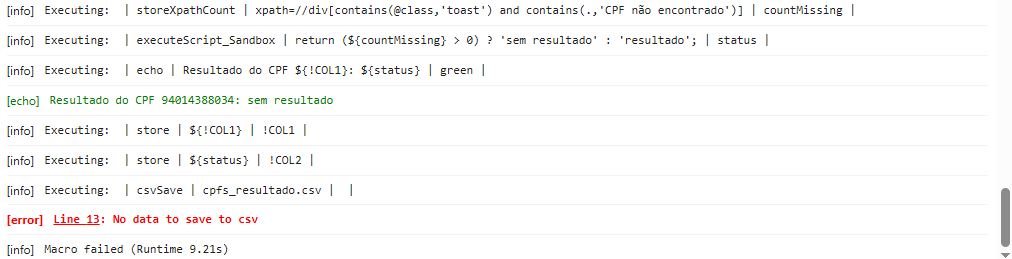
Here is what I’m doing:
{
“Name”: “TESTE 2”,
“CreationDate”: “2025-7-30”,
“Commands”: [
{
“Command”: “csvRead”,
“Target”: “cpfs.csv”,
“Value”: “”,
“Description”: “”
},
{
“Command”: “while”,
“Target”: “${!csvReadStatus} == "OK"”,
“Value”: “”,
“Description”: “”
},
{
“Command”: “open”,
“Target”: “https://crmfgts.app/index.php”,
“Value”: “”,
“Description”: “”
},
{
“Command”: “click”,
“Target”: “id=registerCpf”,
“Value”: “”,
“Description”: “”
},
{
“Command”: “type”,
“Target”: “id=registerCpf”,
“Value”: “${!COL1}”,
“Description”: “”
},
{
“Command”: “click”,
“Target”: “id=btnPesquisarCliente”,
“Value”: “”,
“Description”: “”
},
{
“Command”: “pause”,
“Target”: “2000”,
“Value”: “”,
“Description”: “”
},
{
“Command”: “storeXpathCount”,
“Target”: “xpath=//div[contains(@class,‘toast’) and contains(.,‘CPF não encontrado’)]”,
“Value”: “countMissing”,
“Description”: “”
},
{
“Command”: “executeScript_Sandbox”,
“Target”: “return (${countMissing} > 0) ? ‘sem resultado’ : ‘resultado’;”,
“Value”: “status”,
“Description”: “”
},
{
“Command”: “echo”,
“Target”: “Resultado do CPF ${!COL1}: ${status}”,
“Value”: “green”,
“Description”: “”
},
{
“Command”: “store”,
“Target”: “${!COL1}”,
“Value”: “!COL1”,
“Description”: “”
},
{
“Command”: “store”,
“Target”: “${status}”,
“Value”: “!COL2”,
“Description”: “”
},
{
“Command”: “csvSave”,
“Target”: “cpfs_resultado.csv”,
“Value”: “”,
“Description”: “”
},
{
“Command”: “csvReadNext”,
“Target”: “”,
“Value”: “”,
“Description”: “”
},
{
“Command”: “endWhile”,
“Target”: “”,
“Value”: “”,
“Description”: “”
}
]
}
Even though the
echo command prints the values correctly (e.g. Resultado do CPF 12345678900: sem resultado), the macro fails at csvSave with the “no data” error.My setup:
- Ui.Vision version: 9.5.3
- XModules installed:
- FileAccess XModule: v1.0.12
- RealUser XModule: v1.0.31
- DesktopAutomation XModule: v1.0.42
- Home folder:
C:\Users\Adm\Desktop\uivision
Does anyone know what could be causing this? Do I need to set anything else before csvSave?
Thanks in advance for any help!