I’d like to clear the clipboard before saving new information to it. Is there a way or command to do this in UI Vision? I have not found anything yet with my research. Thanks
Would this work?:
“Command”: “store”, “Target”: “”, “Value”: “!clipboard”
Now I’m not sure if the Target ““ could be replaced with nothing (null value) instead of an empty string.
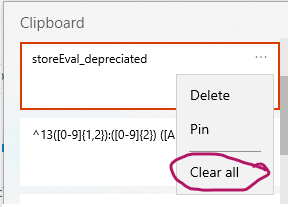
And if you have clipboard history turned on, and you want to clear all entries, you’d likely have to use desktop commands with WindozeKey+v, and xclickrelative for the ellipses (three dots) relative to text “Clipboard” xclick the ellipses and then find “Clear all” and xclick that.
Thanks. I’ll give that a try. Appreciate the help….