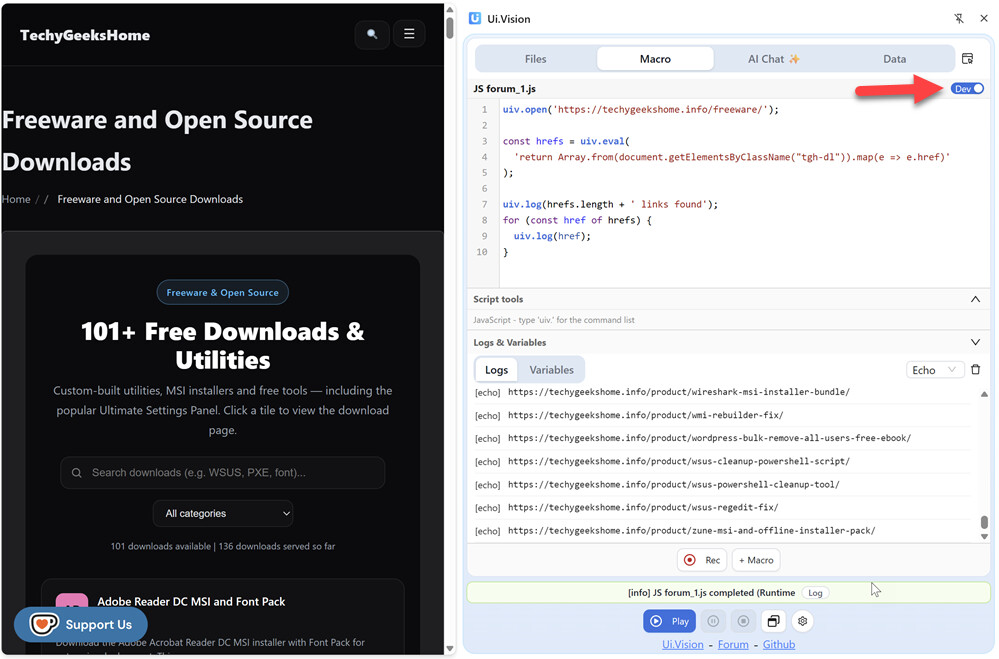
Hello. Consider the below automation that I have created:
{
  "Name": "po",
  "CreationDate": "2026-8-6",
  "Commands": [
    {
      "Command": "open",
      "Target": "https://techygeekshome.info/freeware/",
      "Value": "",
      "Description": ""
    },
    {
      "Command": "waitForElementPresent",
      "Target": "linkText=View Download ⬇",
      "Value": "",
      "Targets": [
        "linkText=View Download ⬇",
        "xpath=//*[@id=\"tgh-grid\"]/div/a",
        "xpath=//div[2]/div/a",
        "css=#tgh-grid > div:nth-child(1) > a"
      ],
      "Description": ""
    },
    {
      "Command": "executeScript",
      "Target": "var stuff = Array.from(document.getElementsByClassName(\"tgh-dl\"));\nreturn stuff;",
      "Value": "ele",
      "Description": ""
    },
    {
      "Command": "echo",
      "Target": "${ele.length}",
      "Value": "",
      "Description": ""
    },
    {
      "Command": "forEach",
      "Target": "ele",
      "Value": "thing",
      "Description": ""
    },
    {
      "Command": "echo",
      "Target": "${thing.href}",
      "Value": "",
      "Description": ""
    },
    {
      "Command": "end",
      "Target": "",
      "Value": "",
      "Description": ""
    }
  ]
}
As you can see, the automation simply opens a web page, then runs a bit of javascript to return a htmlcollection as an array object to the tool. I then want to take that returned array object and, using a foreach loop, echo the “href” property for each object stored in the array. I know that each object in the array has an href property, as I ran the same javascript code in the google dev tools console and looked at the array properties in the console. How do I accomplish what I am trying to do. I thought that the way that I have it set up now would accomplish this, but the echo commands just return “undefined.” What am I doing wrong.
 Rule of thumb: Anything you return from executeScript must survive JSON.stringify → strings, numbers, booleans, and plain arrays/objects are fine; DOM nodes, functions, and the like are not.