Exactly! This is the problem. Luckily the solution is easy. => Use OCR Engine2 then it it works.
You change the OCR engine in the macro or globally:
In macro:
store | 2 | !OCRengine
Global default:
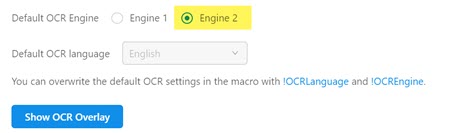
How did I find this out? I used your screenshot and tested it with the online ocr api, which uses the same two OCR engines (no surprise, same company  ): There you see that with Engine 2 it works fine, and “Summer” is detected ok:
