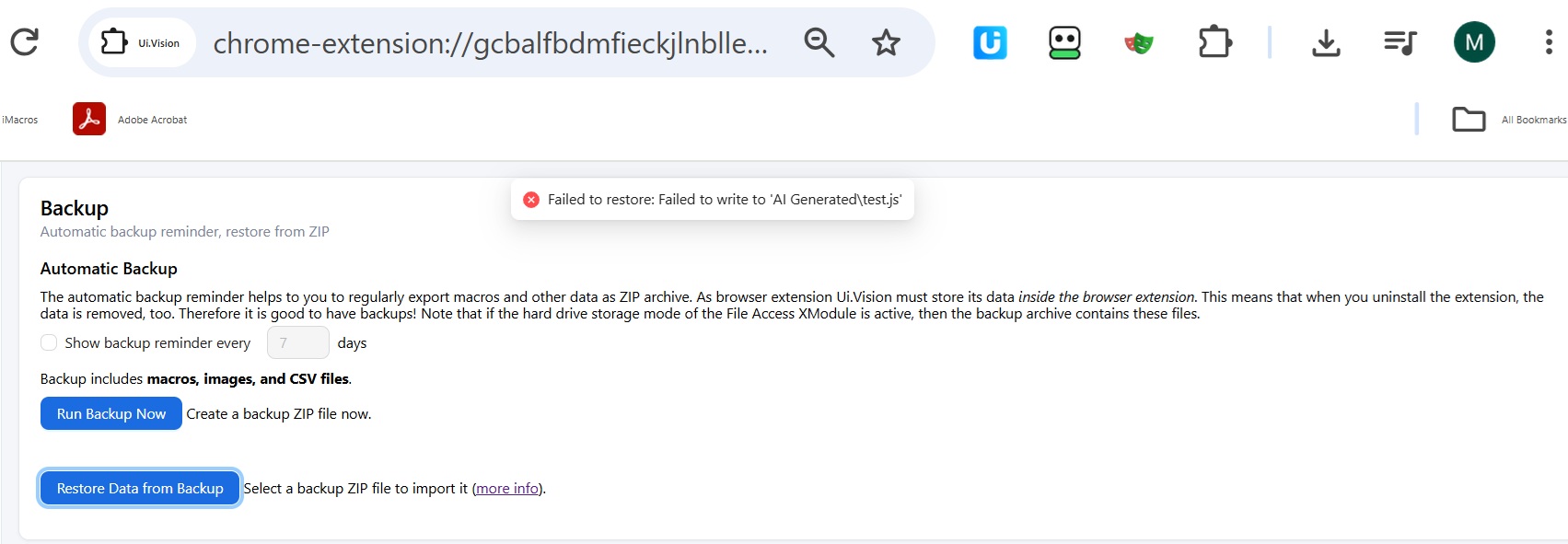
OK, the real story is sometimes I edit the .js macros in VS code. Anyway, I was going to backup and restore the macros. I’m getting an error… Failed to restore: Failed to write to, see picture below… I created a new empty macro directory.. and moved the old macros to another drive.
I’ve tried a couple of things… no luck.. any ideas???
Hi Monte, thanks for the screenshot, it pointed straight at the cause. This is a bug on our side, not something wrong with your files or folders.
When Ui.Vision runs in hard-drive storage mode on Windows, the backup wrote macros that live in a sub-folder (like your “AI Generated” folder) into the ZIP with a Windows backslash in the file name instead of a proper folder. The restore then did not recognise the folder, tried to write the file into a folder that does not exist yet in your new macro directory, and stopped with “Failed to write to”. Restoring into the old folder worked only because the sub-folders already existed there.
Workaround until the update is out: create the sub-folders inside your new “macros” folder by hand (in your case a folder named “AI Generated”), then run “Restore Data from Backup” again. The ZIP itself is fine, nothing in it is lost.
The fix is done and will be in the next release. => After the update your existing backup ZIP will restore as it is, you do not need to create a new backup. From then on new backups will also store sub-folders correctly, so they restore on a fresh PC or a new drive.